This is a little bit of what I have. I added some effects,overlays, some text. I really enjoy being creative because I just feel like it can really pull in the viewer's attention. I would've really liked some more B-roll but because of everything that is happening with the virus and being quarantined, I am not able to get more footage so I'm using what I have. I really don't think this looks bad and I'm happy with how it's turning out. I've been working super hard on it and even though there are some things that I don't like about it, Koree really likes what I have so far and I'm really happy about that. I just really want Koree to be content with the final product. So far I have 2 minutes of the music video edited and I have 1 minute and 30 more seconds to go. I should only need one more day to finish up the music video and maybe I'll have to go back and fix anything if need be. But honestly I've been putting an immense amount of work into this and I have over 100 layers on my time line and it's also really messy because I had to align all the layers and I just have to make sure everything looks right. It's a lot of work to edit this but at least it's what I love.
Sunday, March 29, 2020
Editing !
Editing is my favorite part as I said multiple times on this blog! Just a reminder of what I'm using, it's a software called after effects which is my favorite software to use. I can do so much to my footage. I've been using this software for years ! So I have a lot of experience with it. I really like to get creative with different overlays and effects. I'll edit in a span of days. I'll range from editing for 45 minutes to 3 hours in one sitting. A lot of the time i might just repeatedly watch what I've edited on loop and I'll just keep staring at what I have, thinking about if it looks good or not or if I can make something look better. I tend to be very hard on myself when I edit because I just always want my product to come out the best it can be.

Friday, March 27, 2020
Website ideas
I asked Koree if he could tell me about his music and how he started and such because I was thinking about adding an "about RAWBABYK" section in the website so that people could know where he came from. He told me a lot about himself and I'll add the messages here.


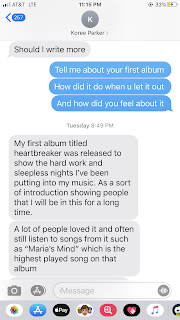 I'm going to use all this information to create a section about him and put a picture of him on the side of the paragraph. This will allow his audience to know more about him as a person. People will be able to know how he got started and why he was interested in making music in the first place. I think it's always really good to know more about artists personal lives and how they came to make their music. By knowing more about an artist it allows the audience to potentially feel more connected to them and maybe relate to them in a way.


Thursday, March 26, 2020
Digipak editing part 2
I got some feedback from Mrs.Stoklosa and she said she liked the photo of Koree on the ATV for the back of the digipak instead of the picture of the close up of his face so I'll be using the other photo instead.


She said she liked this photo the best for the cover

But I can't use it because when I put it into the digipak template on canva, it looks really bad.


The picture just won't fit.
She did mention she liked the other option too but that she didn't like how the words intertwined. I did like the text the way I made it just because I thought it looked less bland but I guess I can just use that picture and just add the text normally. I'll start working on the interior soon, I just really wanted to get the exterior done first. I'm getting everything done on time and I honestly might be done before the due date. Editing the music video is the one thing that takes the most time in my opinion.
These are all the photos that I'm choosing out of for the digipak


These are all the photos that I'm choosing out of for the digipak


Not sure which pictures are going where mostly for the interior but I'm going to be using these photos.
Sunday, March 22, 2020
Digipak decision
Okay so I was staring at the pictures and I think I want to go with option 1.

I had to edit one more song in that I forgot to add but honestly I think I like this more. This is a super short blog I just wanted to post about how I wanted to go with this one instead of the other option. I just really like the close up and and the quality of this photo I think it looks super cool
Digipak exterior
I just made the back of the Digipak.
Option #1
Option #1

I believe this looks accurate? I just added the rest of the songs in the album and added a bar code with some text that you'd usually see in a CD package. In this picture I also edited the color and it looks a lot more contrasted and sharper which is the style I'm going for. I wanted to add this kind of scribble font because I just think it matches to vibe of everything. I wasn't sure if I should place the list of songs on the side so it's out of his face or in the center. I looked up some examples of digipaks and decided to place it in the middle

Here's the unedited version.
Option #2
I also made a second option for the back of the package. I really like this picture alone like without anything on it but I also kind of like it as the exterior for the package. I initially wanted to use this as the cover but I was having trouble with fitting the text the way I wanted to.

Saturday, March 21, 2020
Website editing
I've been working on creating the website. So war I've added some pictures, and a few tabs. I also added his song and album. I created a merchandise tab which I think I did it right? I'm not sure because I just used a gallery tab and changed the name to merchandise to just put the shirts on display. I still need to add a small description about him and the final music video. Here's some pictures of the website so far.


I did add a tour dates tab but I'm not sure if I keep the fake tour dates on there or change it to "no tour dates available". I did try changing it to "no tour dates available" but I could not figure out how to do that . This is my first time using Wix so I'm still learning.
Friday, March 20, 2020
Digipak editing
I've been trying to edit the cover photo of the digipak for about over an hour now. The only reason I've been spending so much time on one photo is because I'm trying to place the text a certain way but since the composition of the digipak is a square, the text placement keeps looking weird. Here are the first photos I was editing.


So in this picture I just added some text of the album name

In here I added a color filter which really makes him pop out more and then I added a glow effect on the text and I masked his head so I could put the text "breaker" behind it. However, this did not end up looking right in the square composition because the text was so high up so I decided to just change the whole cover picture.

I ended up using this picture. I again masked his body and I actually think the "breaker" text looks really cool since it's actually intertwining through his body. I then added the glow effect on the text and the color filter again. I put it on to the square composition in canva and it looks good. So I will be using this picture for the cover. As of right now I like how this looks but we'll see, maybe I'll change it.
Subscribe to:
Posts (Atom)

-
 My focus is now all on my digipak and website since I finished the music video. I started to create the interior I'm thinking about ...
 -
 I've been making some improvements on my website. For the home page I fixed the layout so my new picture could fit. I changed the photo ...
